 Qchu
Qchu
Muting notifications
You can turn notifications off entirely, silence them for a time window, or keep only the topics you care about.
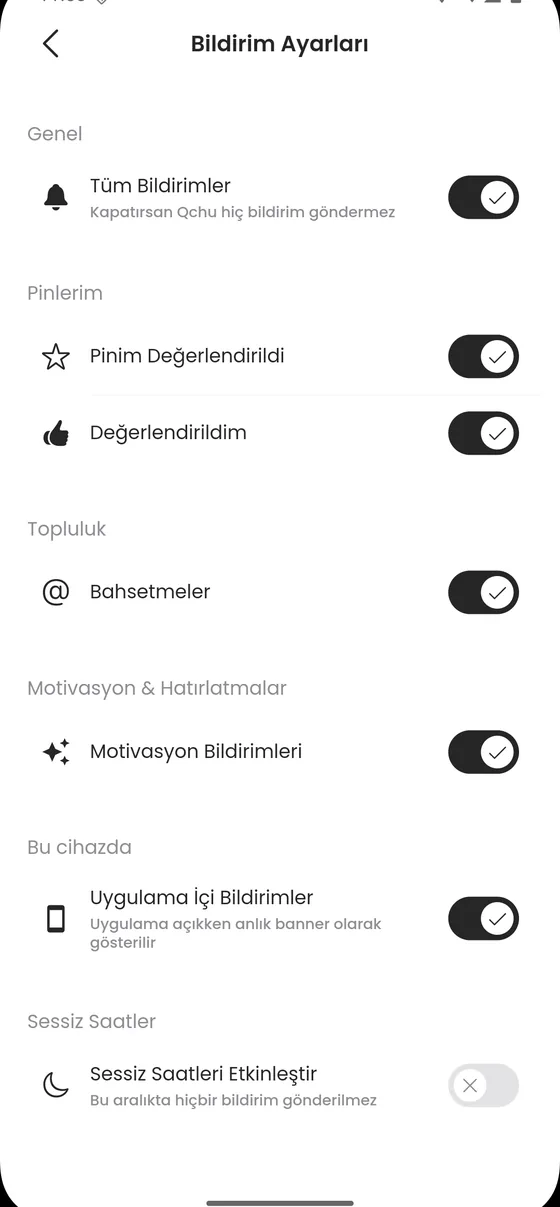
Getting to notification settings
- Tap your profile photo at the top left to open the drawer.
- Ayarlar › Bildirim Ayarları.
Quiet hours
Sessiz Saatleri Etkinleştir (enable quiet hours) lets you set a start and an end time. In the app's own words, no notification is sent in that window. If you do not want notifications at night, this is the setting.
Turning topics off one by one
- Pinlerim (my pins): notifications about your own pins, for example when one is evaluated.
- Topluluk (community): when you are mentioned in a chat.
- Motivasyon & Hatırlatmalar: reminder style notifications.
Turning everything off
Turn off the Tüm Bildirimler switch at the top and Qchu sends nothing at all. Uygulama İçi Bildirimler is a separate setting: it controls the banner that appears while the app is open.
The setting is saved on the server. Without a connection the app says the setting could not be written and asks you to try again; in that case it was not saved.