 Qchu
Qchu
What is a pin, and how do I add one?
A pin is a record of what you saw at one point on the map: a dog, a cat, a water and food bowl, or a shelter. Once you add it, everyone nearby sees it on their map.
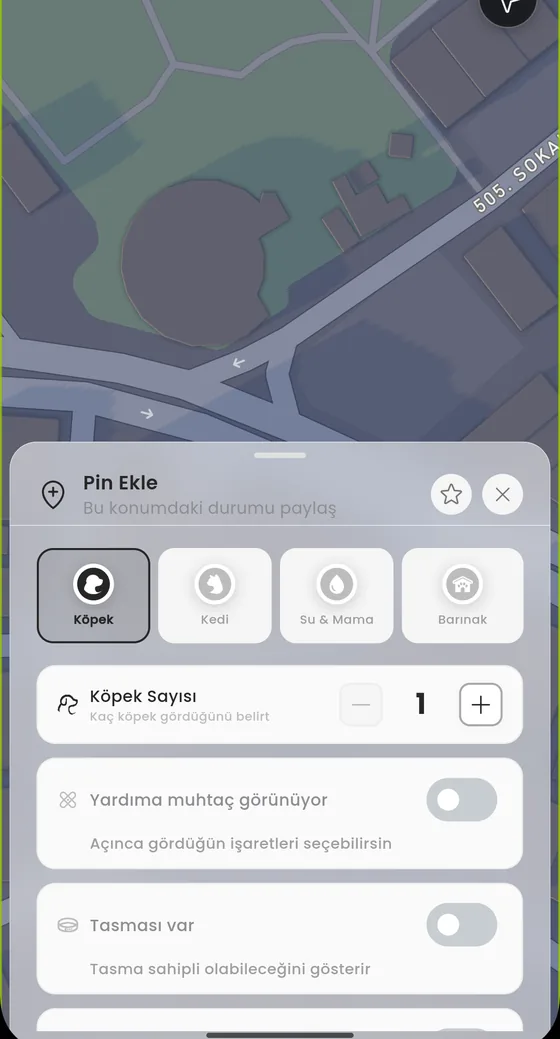
There are four pin types
You choose the type first, and the questions change with it. What matters for a dog is not what matters for a water bowl.
- Köpek (dog) the dog or dogs you saw
- Kedi (cat) the cat or cats you saw
- Su & Mama (water and food) a bowl, a feeding spot or a station
- Barınak (shelter) a cat house, a dog kennel or a mixed shelter
Adding a pin
- On the home screen tap Haritayı Aç (open the map) to go to the full map.
- Press and hold on the map at the spot you want. The Pin Ekle sheet opens at the bottom.
- Pick the type from the four buttons at the top.
- Fill in the fields for that type. A dog pin asks how many you saw, whether it has a collar and whether it looks like it needs help; a water and food pin asks for the station type and how full it is.
- Set the exact spot by dragging the map. The screen says Haritayı sürükleyerek konumu seç (drag the map to choose the location) and the point lands under the centre marker.
- Add a photo if you want. The Fotoğraf ekle field is optional.
- Submit. The pin appears on the map with its own icon.
Why the exact spot matters
A pin is searched for where it was placed. If a water bowl you added lands on the wrong street, whoever goes there will not find it. Before you submit, zoom in and check that the marker really sits on the right corner.
Photos go through review. Until review finishes the photo is not shown on the pin, but the pin itself stays visible.
What happens after you add it
The pin shows up on nearby users' maps and in the Çevrendeki Canlı Pinler (live pins around you) list. The pin detail shows when it was reported and how many people have contributed.
On water and food and shelter pins, anyone who comes within about 150 metres can update the state, including you on your own pin. Dog and cat pins have no update flow; there you continue through the pin chat.